
How to book a studio
Search your dates on the booking page, pick a studio, choose either an overnight stay or a 3/6/12-hour day-use block, enter your WhatsApp number, name and email, your country and how many of your guests are children, and optionally your arrival time and any special requests, then pay by card, UPI or netbanking. Stays of 7+ nights get 10% off and 30+ nights get 20% off, applied automatically. You do not need an account first — one is created so you can manage the booking afterwards.
Before you start
- Your dates, and whether you need an overnight stay or a daytime block
- A working email address — your confirmation and portal access go there
- A 10-digit Indian mobile number, so the front desk can reach you on the day
- A payment method: card, UPI or netbanking
Booking works the same whether you already have an account or not. If you book as a guest, the booking is matched to your email and a portal login is created, so everything stays in one place afterwards.
- Open the booking page and set your dates
Go to Book on the website. Enter when you want to arrive and how long you need. Availability is live, so anything shown is genuinely bookable at that moment.
What this screen needs from you
What you enter Required Format Example Check-in datePast dates are not selectable. Required Date, today or later 2 Sep 2026Duration or check-outChoosing a day-use block switches pricing to that block’s rate. Required Nights, or a day-use block 1 nightGuestsUsed to filter out studios that cannot take your party size. Optional Number 2
The booking page. Availability updates as you change dates. - Compare and choose a studio
Each studio shows its nightly rate and, where offered, its day-use blocks. Pick the one you want to continue with.
Not every studio offers every day-use block. If a 3-hour block is not listed for a studio, it is not bookable for that studio.

Studios are shown with their real rate for the dates you chose. - Check the total, including any long-stay discount
Stays of 7 nights or more get 10% off, and 30 nights or more get 20% off. The discount is applied automatically and shown under the total, for example “₹3,000 × 7 · 10% weekly discount”. The total you see is the amount charged.
The discount is worked out from the number of nights in one booking. Two back-to-back bookings of 4 nights each do not add up to a weekly discount.
- Enter your details
Give the number and name the booking should be under, and your email for the receipt. Then tell us where you are from, how many of your guests are children, and, if you like, when you expect to arrive and anything you would like ready. These reach the front desk with your booking.
What this screen needs from you
What you enter Required Format Example WhatsApp numberYour confirmation and arrival details come here. Required 10-digit Indian mobile, or +country code 98765 43210Your nameThis is the name reception will check against your ID at arrival. Required Full name Aarav SharmaEmail (for your receipt)Confirmation, invoice and portal access all go here. Check it carefully. Required name@example.com aarav@example.comCountry Required Choose from the list IndiaOf the guests, children under 12Shown only when you book for more than one guest. Optional Number 1Expected arrivalOvernight stays only. Helps the desk have your room ready. Optional Half-hour from 12 noon 3:30 pmSpecial requestsA request, not a guarantee: reception confirms what is possible. Deleted automatically 30 days after you check out. Optional Up to 1,000 characters Early check-in if possible, extra pillows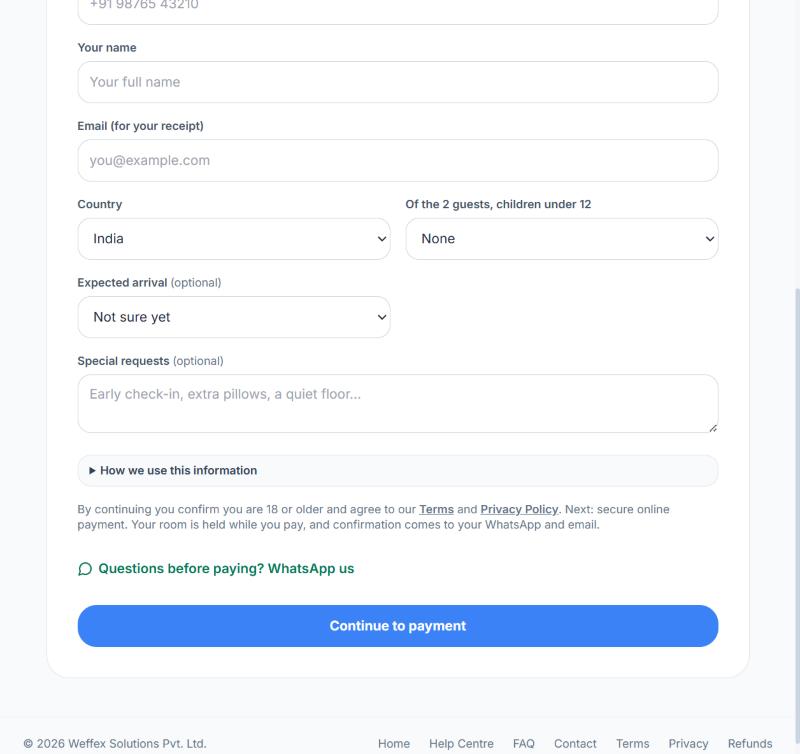
Who’s staying? Country, children, arrival time and special requests sit under your contact details. - Pay
You are taken to our payment provider to pay by card, UPI or netbanking. Your booking is confirmed as soon as payment succeeds, and you are returned to Smart Studios.
Do not close the payment window while it is processing. If you do, the booking is kept as unpaid rather than lost — reopen it from My Bookings and pay again.
What happens next
- A confirmation email arrives immediately with your booking details
- The booking appears under My Bookings in the portal
- A GST invoice becomes available under Invoices
- Online check-in and your arrival QR code become available on that booking
If something goes wrong
- Payment failed or I closed the payment page
- The booking still exists, marked unpaid. Open it under My Bookings and pay again — you do not need to rebook.
- No confirmation email arrived
- Check spam first. If it is genuinely missing, the booking is still valid — sign in to the portal and check My Bookings, then message support.
- The slot I wanted disappeared while I was booking
- Someone else completed a booking for it first. Pick another time, or join the waitlist for that exact slot.
- I mistyped my email
- Message support with the booking reference. The booking exists against the address you entered, so it needs correcting on our side.